chili-raw-photo

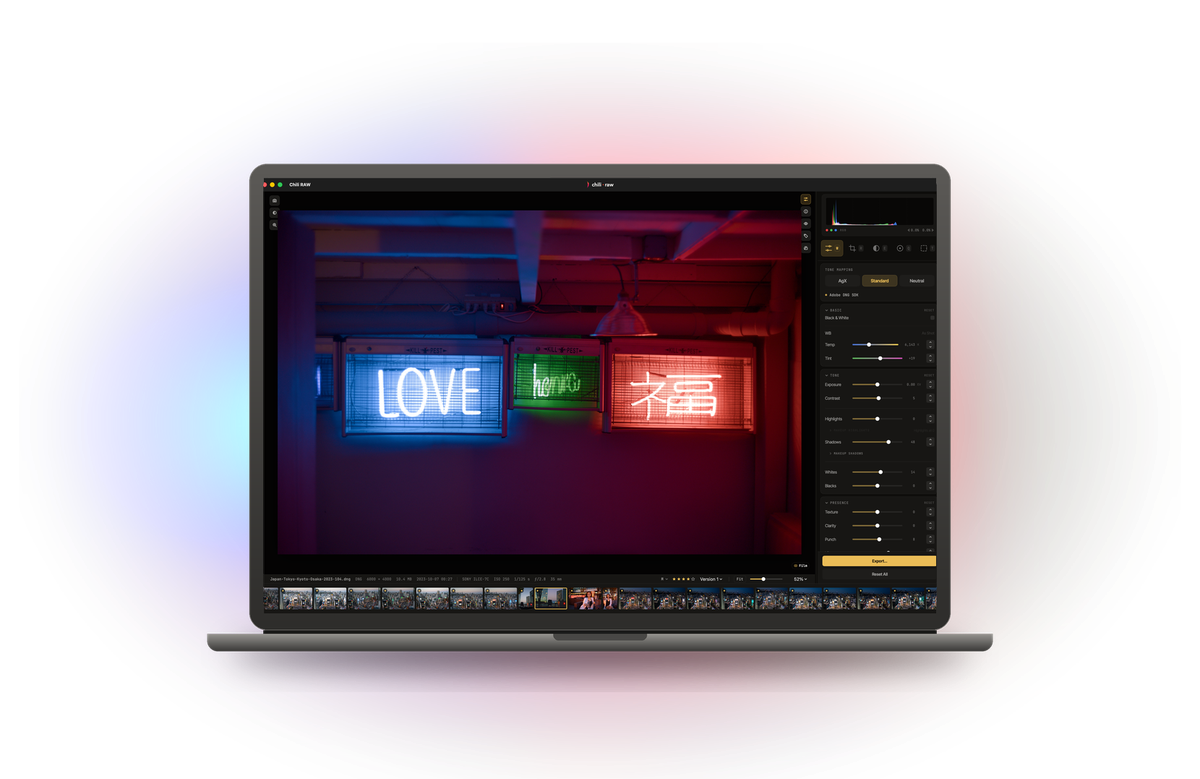 **[⬇︎ Download Chili RAW 1.0.0](https://github.com/halebop17/chili-raw-photo/releases/latest)**
macOS 15 Sequoia or later · Apple silicon (M1 or newer)
**[⬇︎ Download Chili RAW 1.0.0](https://github.com/halebop17/chili-raw-photo/releases/latest)**
macOS 15 Sequoia or later · Apple silicon (M1 or newer)Browse all releases · Read the manual · Report a problem `macOS 15+` `Apple silicon` `v1.0.0` `Free to use` `No account`
About Chili RAW
Chili RAW is a complete RAW photo workflow for the Mac.
The grid is a full asset manager: burst stacking, filters for rating, flag, media type, place and people, Smart Folders, Collections, and search that finds a photo by filename, keyword, place — or by what is in the picture. The develop side is a non-destructive RAW pipeline with tone, curves, colour, local adjustments and masking, plus LUTs, film-stock looks and a full film darkroom. Add culling, geotagging, metadata editing and export, and it is the toolset you would expect from Lightroom, in one window.
It reads the folders you already have. Nothing is imported, copied or uploaded, and your original files are never modified.
It runs on Apple silicon and nothing else. The develop pipeline is built on Metal and Core Image, the AI runs on the Neural Engine, and the interface is native AppKit and SwiftUI rather than an imitation of one.
All of that is free — no account, no watermark, no time limit, and nothing withheld from it. A Pro licence adds the film darkroom, the paint canvas, the on-device AI tools and depth-based bokeh.
Chili RAW is free to use, but it is not open source. This repository is where the app is distributed and supported — releases, the manual, and issues. The source is not in here.
What it does
Cull
- Ratings, picks, rejects and colour flags, all from the keyboard.
- Burst Stacks — a run of frames collapses into one tile until you open it.
- Compare and Survey side-by-side modes, with zoom and pan synced across panes.
- A hover Loupe showing real pixels under the cursor, with focus peaking.
- An on-device Vision score that puts the likely keepers first.
- A distraction-free Darkroom for judging a frame with nothing else on screen.
Develop
- Three RAW decoders you choose between — Apple CIRAWFilter, the Adobe DNG SDK, and LibRaw with your own DCP profiles — and three tone mappers (AgX, Standard, Neutral).
- Compressed DNG, including the JPEG XL compression DNG 1.7 introduced.
- Tone, curves, colour mixing, texture, clarity and a physical dehaze.
- RAW highlight recovery drawn from the file’s own headroom.
- Eleven kinds of mask that add, subtract and intersect.
- Feather and Edge on a detected mask — one softens the boundary, the other moves it in or out by an exact distance, which is what a slightly-too-wide cutout actually needs.
- Sky, Object and Depth masks, and portrait editing by face part. *
- Heal, Clone, and cross-frame dust detection.
- Generative Remove — paint over an object and the background is rebuilt. *
- AI denoise, motion-blur rescue and AI Detail. *
- Bokeh — a depth-driven optical blur with a five, six or seven-blade iris. *
- Lens corrections from your camera’s own tables or the bundled Lensfun database.
- Crop, straighten, perspective, and auto level across a whole selection.
- Multiple versions per photo, batch editing with Auto Sync, and Proof mode.
Film Labor *
- Eighteen film stocks and eight papers, each modelled from published datasheets.
- The stages a real frame goes through: exposure onto the negative, halation, grain, the print, and the light you view it under.
- A ring-around that renders your own frame at seven steps either side of where you are.
Organise
- A searchable catalog with Smart Folders and Collections.
- Search across filenames, IPTC and Vision keywords — or by what is in the picture. *
- People — faces detected, grouped and named, entirely on your Mac. *
- Geotagging with offline place names: no geocoding service, no network request.
- EXIF/IPTC editing in bulk, written to the file or an XMP sidecar.
- Vault backups to another drive.
Pixels *
- A layer canvas over the developed photo: type, borders, glowing date stamps, dithered gradient washes, and a Deluxe-Paint palette.
- Enlarge — click an object and scale it up in place.
Export
- JPEG (jpegli), JPEG XL, HEIC, 16-bit TIFF and layered PSD.
- Resize with output sharpening applied to the pixels that actually get written.
- AI upscaling when you are enlarging past the original. *
- Batch renaming, metadata policy, GPS and person-info stripping.
Video
- Clips sit in the grid with the photos, play full screen, and take a colour grade applied frame by frame on export — HEVC or H.264, in a MOV or MP4.
Features marked with an asterisk (*) require a Pro licence.
Installing
- Download the
.dmgfrom Releases. - Drag Chili RAW to your Applications folder.
- Open it.
Privacy
- Your photos stay where they are. Chili RAW reads folders on your disk. It never imports, copies or moves your originals, and never overwrites your pixels.
- No account, no telemetry, no analytics, no crash reporting.
- The app makes two kinds of network request: downloading an AI model when you press Download, and a one-time licence activation if you unlock Pro. Nothing else in it talks to the internet — place names come from a table inside the app, and no image ever leaves your Mac.
Chili RAW Pro
You can support development and unlock every feature with a Pro licence — $29.99, once.
It is perpetual rather than a subscription: the version you unlock is yours to keep, and
updates are included. Buy it on the website, or inside the app under
Settings ▸ Pro.
Even without a licence the app stays useful indefinitely: culling, developing, cataloguing, geotagging and export are free, with no account, no watermark and no time limit. A 7-day trial is available if you want to evaluate the Pro features before deciding.
Bugs, requests, questions
Open an issue. There are three forms — a bug, an unsupported camera, and a feature request — and they ask for your Mac, your camera and which RAW decoder you had selected. That last one matters more than it sounds: Chili RAW reads RAW files through three different decoders, and a camera can be handled correctly by one and badly by another, so knowing which you were on is often the whole diagnosis.
If you can attach a single unedited file from the card, a colour or decoding bug usually gets fixed in one pass instead of three.
Built on the work of others — ExifTool, LibRaw, the Adobe DNG SDK, libjxl, GeoNames, Lensfun and more.
Film and paper names identify the stock being emulated; the emulations are built from published datasheets and are not replicas.